




The summary

The top part of the summary section includes key information about the rental property, including:
- the rental address
- rent amount
- the move-in date
- the date the report was generated
- the applicant’s name
- an approve/decline button
- an option to download the PDF version of the Tenant Screening Report
Metrics and QR verification
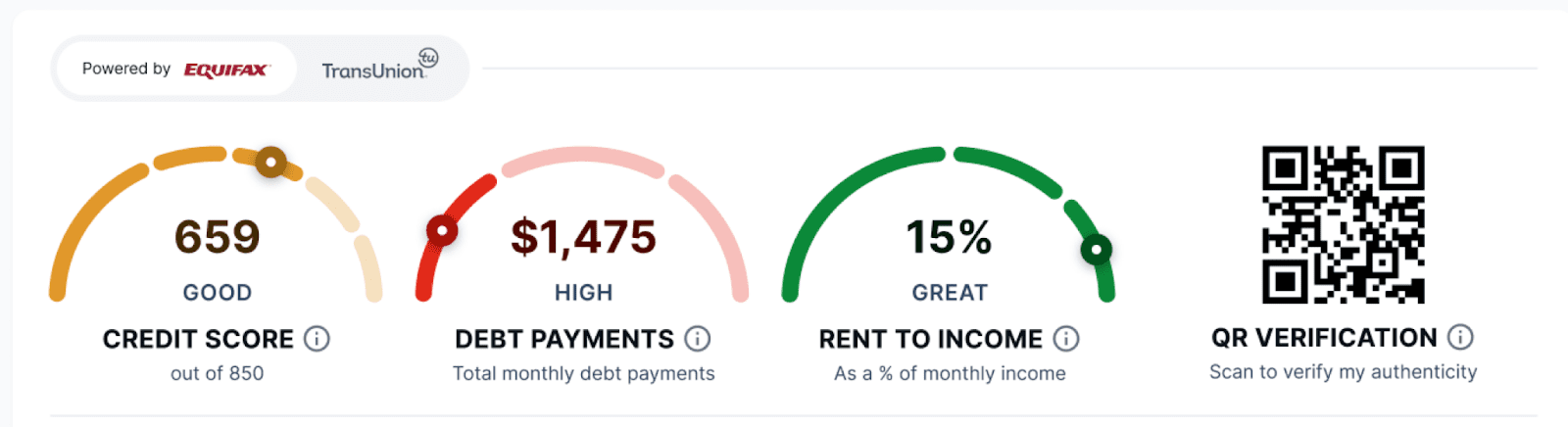
Credit score: This is the overall credit score for the applicant. A more detailed breakdown of what makes up this score is available in the credit section of the report.
Monthly debt payments: This is the sum of the total monthly debt payments from all outstanding debt and credit tradelines from the credit report. Heavily indebted renters may experience more challenges paying rent on time.
Rent-to-income ratio: This financial metric is calculated using the household’s income and measures how much of that income goes toward rent. It’s expressed as a percentage of their monthly income. In an ideal situation, approximately one-third of a household’s monthly income should go to rent. Generally, the lower the rent-to-income ratio, the less likely the tenant will default on their rent payments.
Positives and warnings
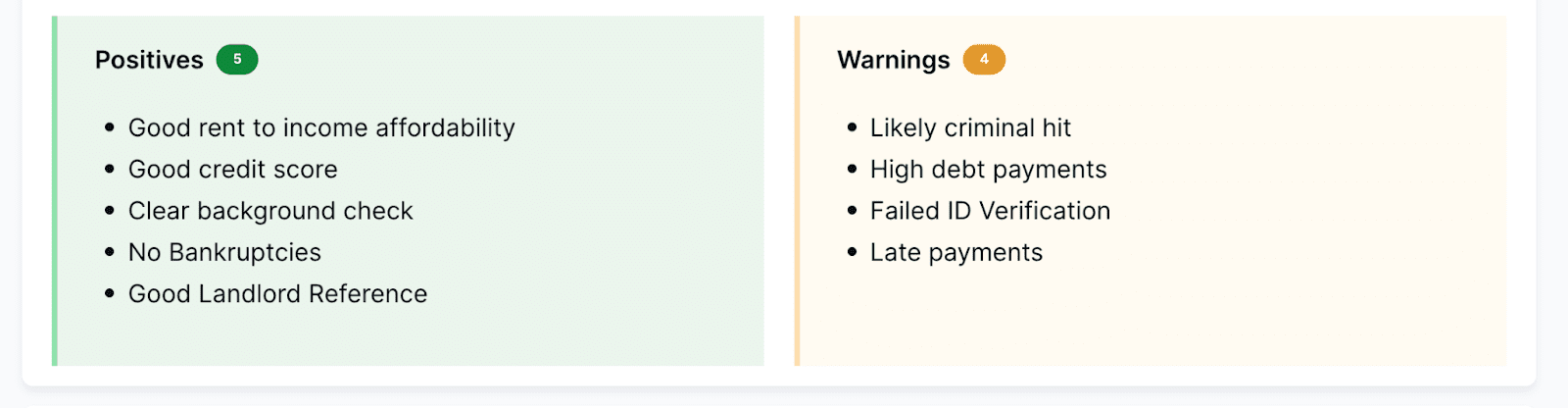
Here, you’ll find a summary of the report’s key findings about the applicant, both positive and negative. You can use these facts to assess their suitability as a tenant quickly and see what areas require further investigation.

Applicant overview
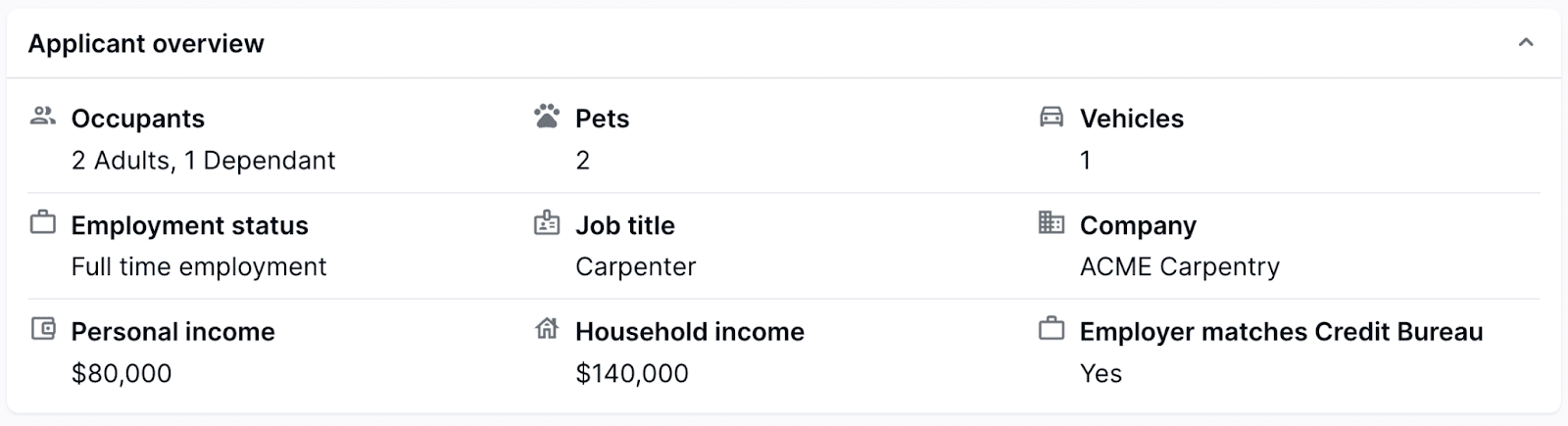 The details in the applicant overview give you basic information about the individual, such as their employment status, job title, personal income, household income, pets, vehicles, and the number of people expected to occupy the rental. There may also be a note that confirms that their employer info matches the credit bureaus’ records.
Credit overview
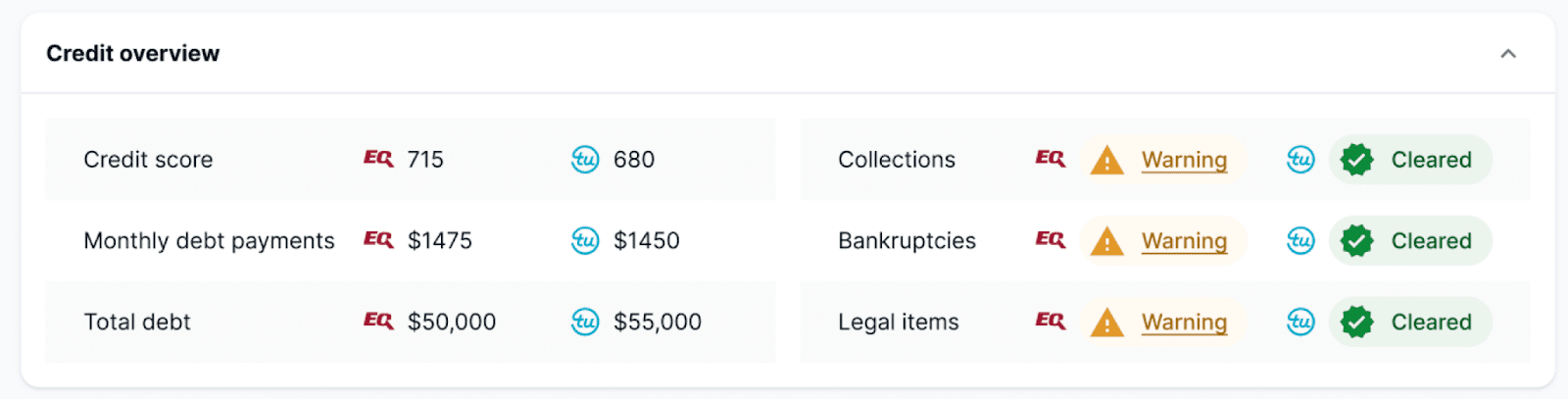 This section summarizes the most crucial points from the applicant’s credit check. It usually contains the credit score, monthly debt payment size, total debt owed, and negative remarks, such as bankruptcies and accounts sent to collection agencies.
Public record overview
In the public record overview, you’ll find the results of a scan of publicly available information related to the applicant. If their history includes items like problematic behavior, court appearances, or criminal activity, a “warning” icon will appear. If there are no results from the public scan, they’ll be marked as “cleared.”
Rental application
This part of the Tenant Screening Report is the actual rental application form that the tenant has filled out. This information comes directly from the applicant.
Personal details
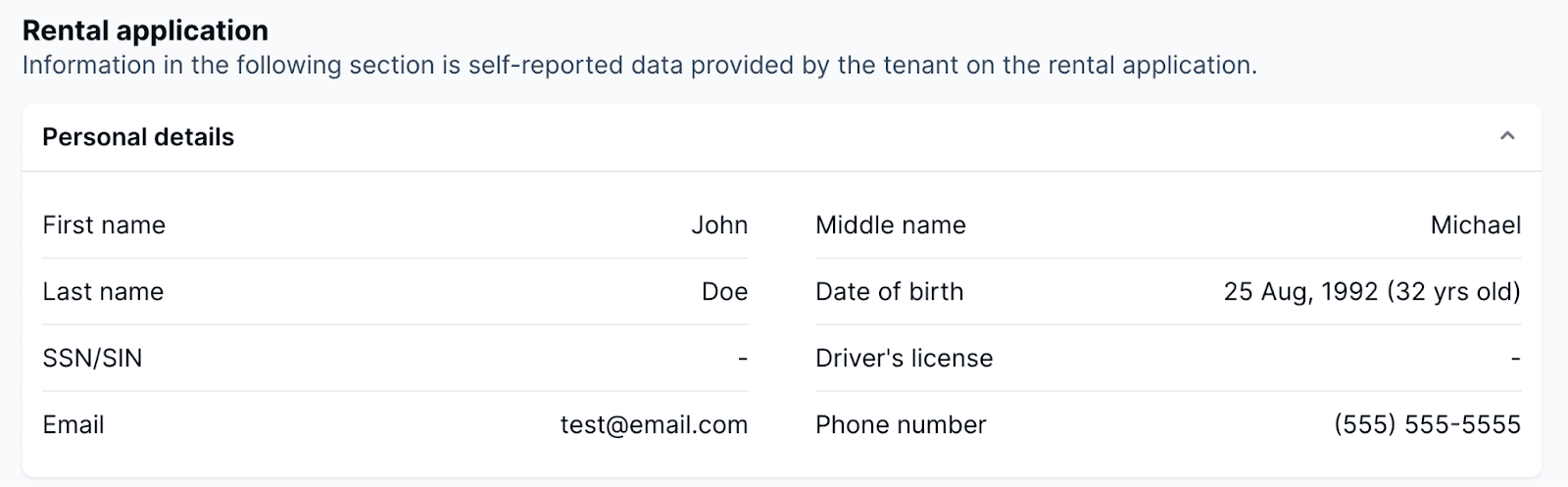
Having an applicant’s full name, phone number, date of birth, email address, SSN/SIN (last few digits if completed by the applicant), and driver’s license number will help you verify that the person is who they say they are.
Address history
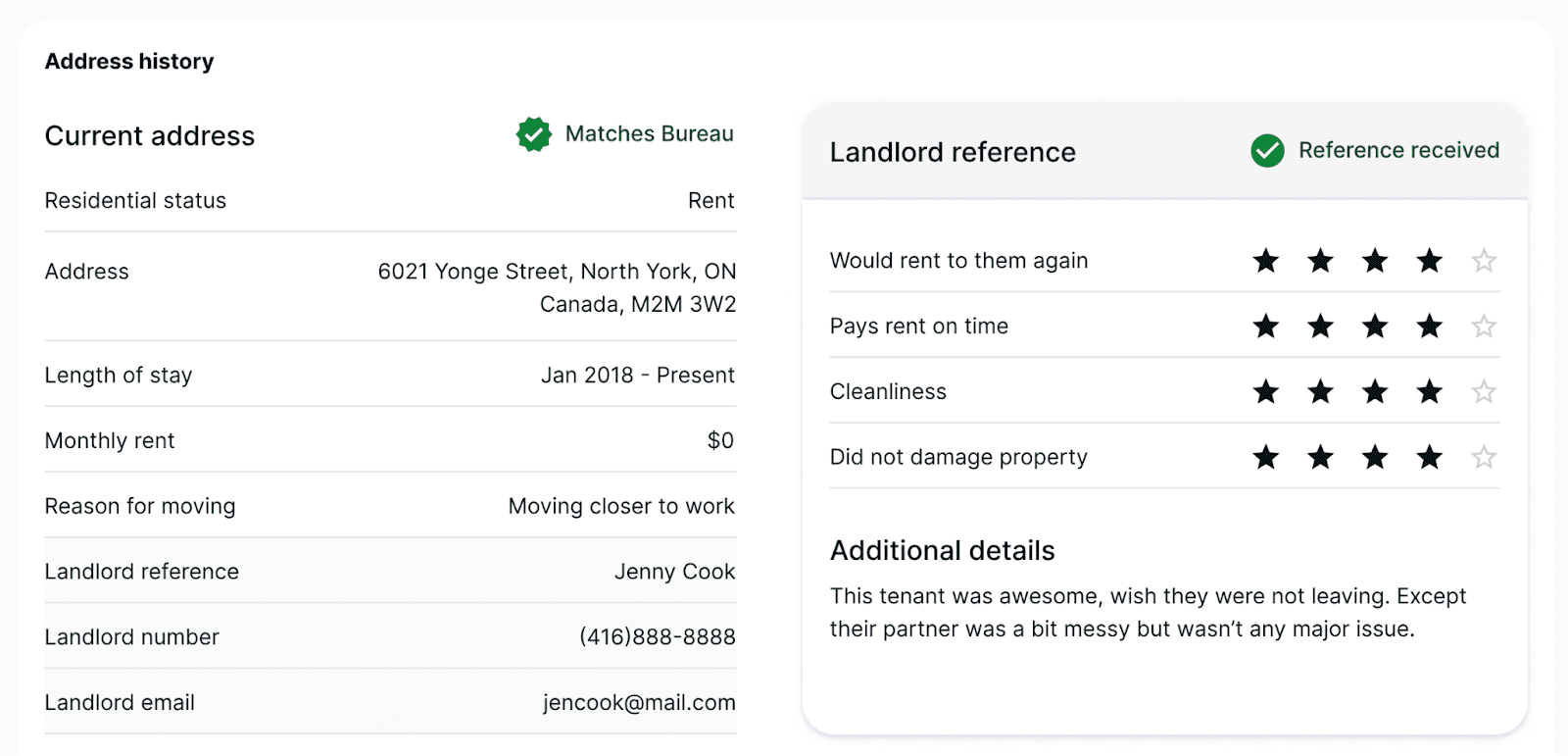
This section notes the applicant’s current residence, how long they’ve lived there, and their reason for moving. If the applicant is a renter, you’ll also find their landlord’s name, contact information, and monthly rent here.
Previous address
This section outlines the tenant’s past residences, including addresses and landlord contact details. This information will come in handy when you conduct a landlord reference check.
A green checkmark with “Matches Bureau” in this section means that the rental address matches the reported address from the credit bureau. This gives you a high degree of confidence that the address provided by the applicant is accurate.
Landlord references
An automatic survey is sent out to the landlord’s email provided by the tenant in the rental history section. If everything comes back positive, take this with a grain of salt, because the applicant could have used someone else to provide a positive reference. If the reference comes back with less than five stars and with critical comments, then you likely have a legitimate landlord reference, and now you have more information to make an informed decision about the applicant.
Current employment
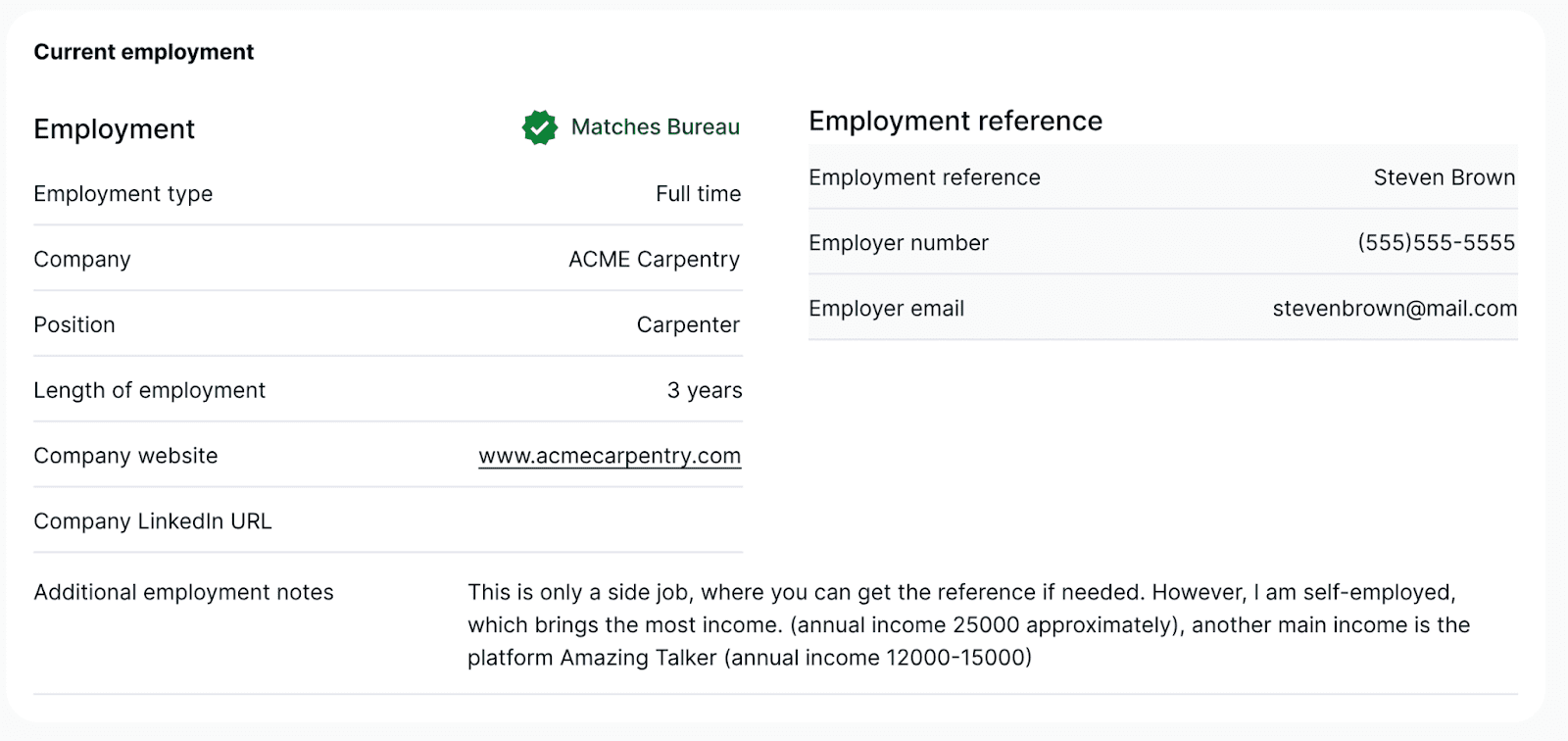
This section contains the applicant’s current employment details. It usually lists the name of their employer’s organization, their employer’s job title, the length of employment, and whether they work full-time or part-time. You’ll also find the contact details of their supervisor or another job-related reference. All of this information will be helpful when doing an employment reference check.
The tenant’s employment data matches what was reported to the credit bureau when you see the green “Matches Bureau” checkmark.
Income 
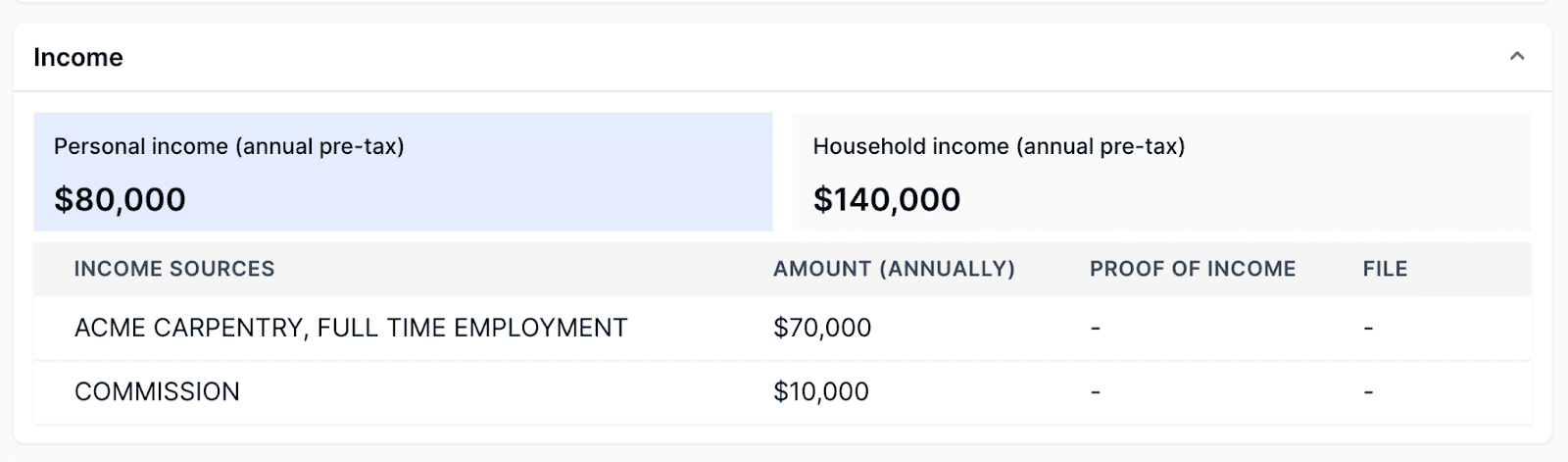
This part of the tenant screening report lists the applicant’s personal and household income before taxes. It’s one of the most critical factors to consider when deciding whether to accept someone to be your tenant. There’s usually an accompanying note specifying the documents the applicant has submitted as proof of income. These documents may also be attached to the report.
Within the report you’ll find income listed as personal and household income before taxes. Documents submitted as proof of income are noted and may be attached to the report.
If the landlord ordered Bank-Verified Income as part of the screening, this is where the self-reported income figures become especially useful. Not necessarily as the final word, but as a baseline to cross-reference against the verified bank data in the Bank Verified Income section below. When a tenant claims $5,000 per month in household income, Bank-Verified Income lets you check that number against what’s actually hitting their account.
For a full walkthrough of the Bank-Verified Income section and what each part of the verified income data means, see the Bank Verified Income section below. You can also watch the walkthrough video here.
Mac’s Pro Tip: For the record, self-reported income isn’t useless. It tells you what the tenant believes (or wants you to believe) their income is. It’s important to compare it against an independent source such as data pulled directly from their account. If the numbers line up, that’s a strong signal. If they don’t, that’s a conversation worth having before you sign a lease.
Bank Verified Income
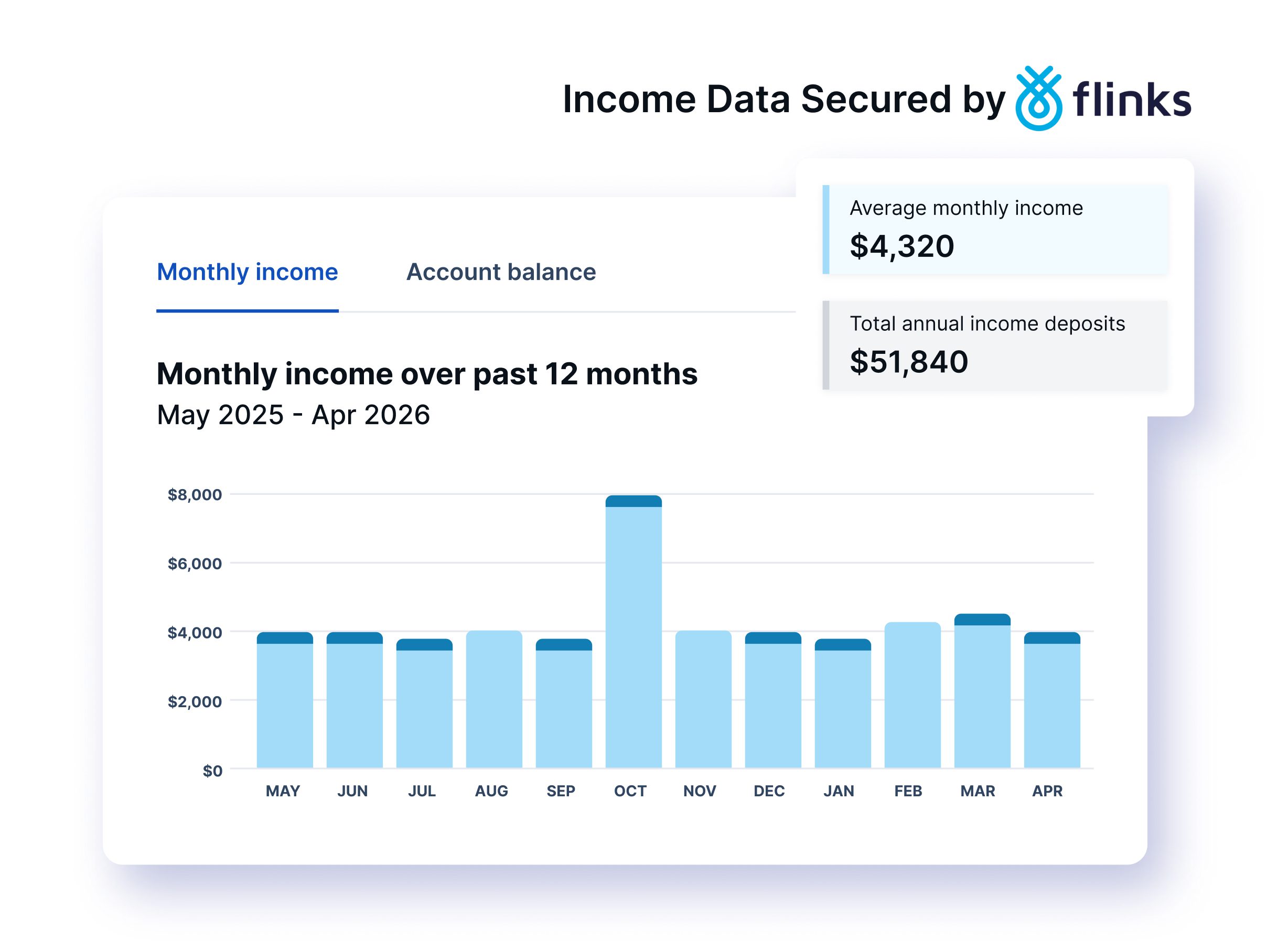 If the landlord added Bank-Verified Income to the screening order, the report will include a dedicated Bank Verified Income section powered by Flinks. Flinks is the same secure financial data infrastructure trusted by major Canadian banks and financial institutions.
Unlike the self-reported income figures in the Rental Application, everything in this section comes directly from the tenant’s bank. The tenant connected their account through Flinks, and the data was pulled straight from their financial institution. They didn’t upload it, didn’t screenshot it, and didn’t have the ability to modify it in transit. What you’re seeing is what the bank sees.
Verified Monthly Income and Balances
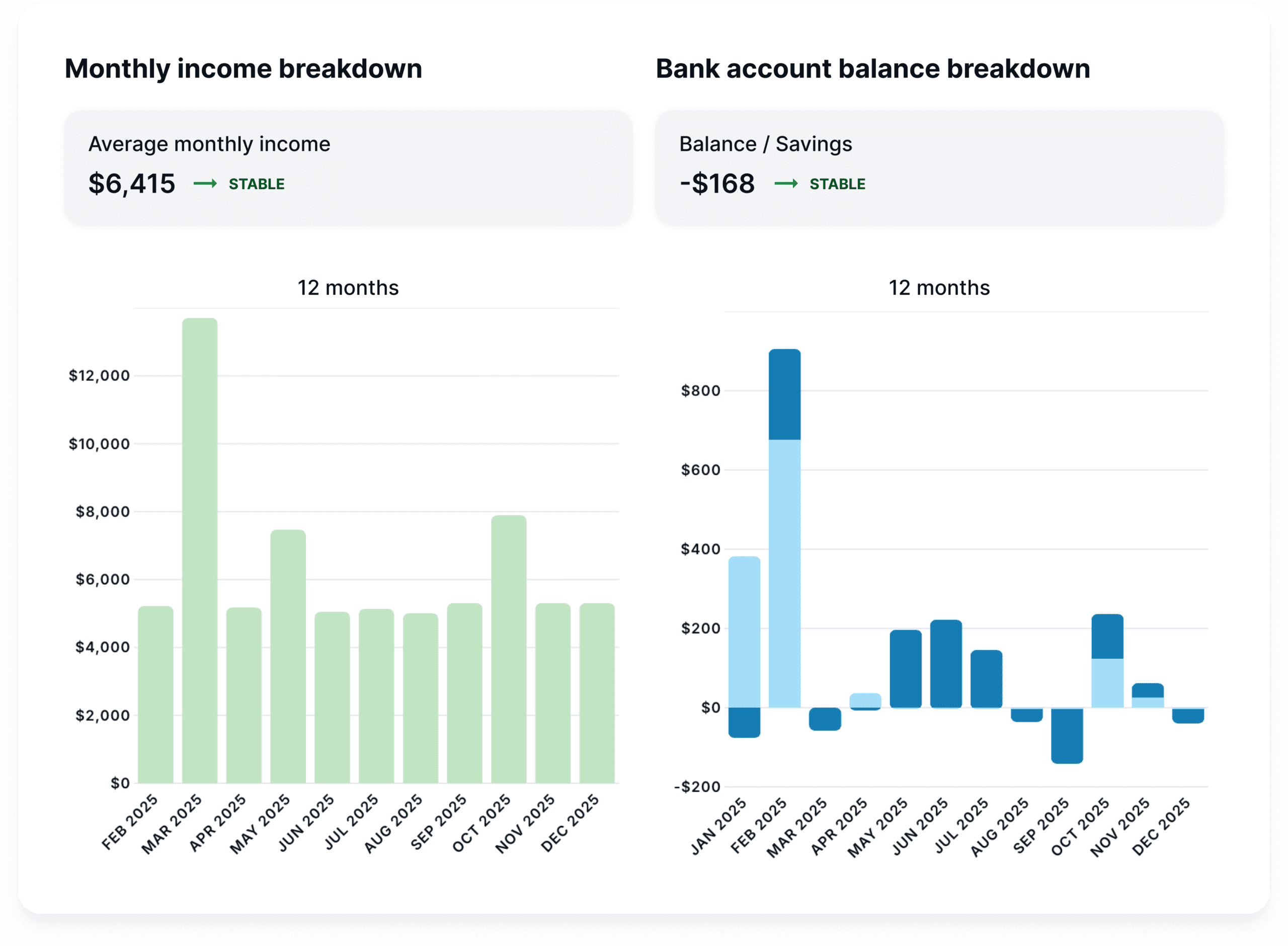
At the top of the Bank-Verified Income section, you’ll find bar charts showing the tenant’s monthly income and expenses over recent months. Income appears as darker bars, expenses as lighter bars, giving you an immediate visual of whether this tenant’s earnings are consistent, growing, or declining, and how their spending compares month over month. These charts help you understand whether the tenant’s financial trajectory is improving, holding steady, or heading in the wrong direction.
Mac’s Pro Tip: Look for consistency vs the total. A tenant earning $4,000 per month for six straight months is a stronger signal than someone who earned $8,000 one month and $1,500 the next, unless their average monthly balance shows the ability for the tenant to save money over multiple months. For gig workers, freelancers or multiple job holders, some variation is normal, but the overall trend should be stable or upward.
Income Assessment Snapshot
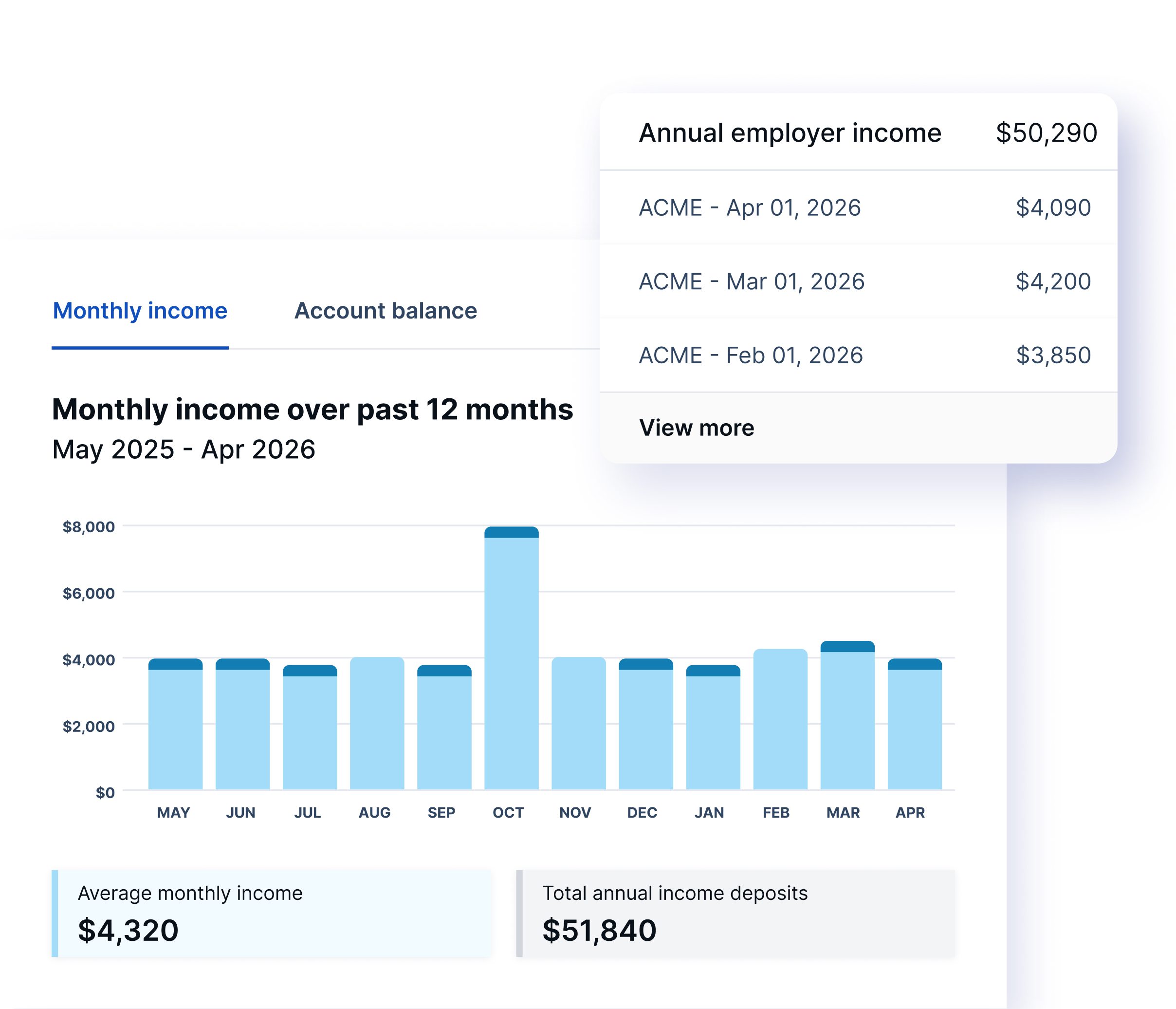
This section gives you the key numbers at a glance:
- Current balance across connected accounts
- Average monthly income over the reporting period
- Average monthly expenses over the reporting period
- Total number of transactions analyzed
These figures are calculated from actual bank transaction data, not from anything the tenant self-reported on their application.
Mac’s Pro Tip: The rent-to-income ratio in the Metrics section at the top of the report is based on self-reported income. With Bank-Verified Income, you can calculate your own ratio using verified average monthly income. If the tenant reported $6,000 per month but the bank data shows $4,200, that changes your rent-to-income math (and potentially your decision).
Detailed Income Breakdown
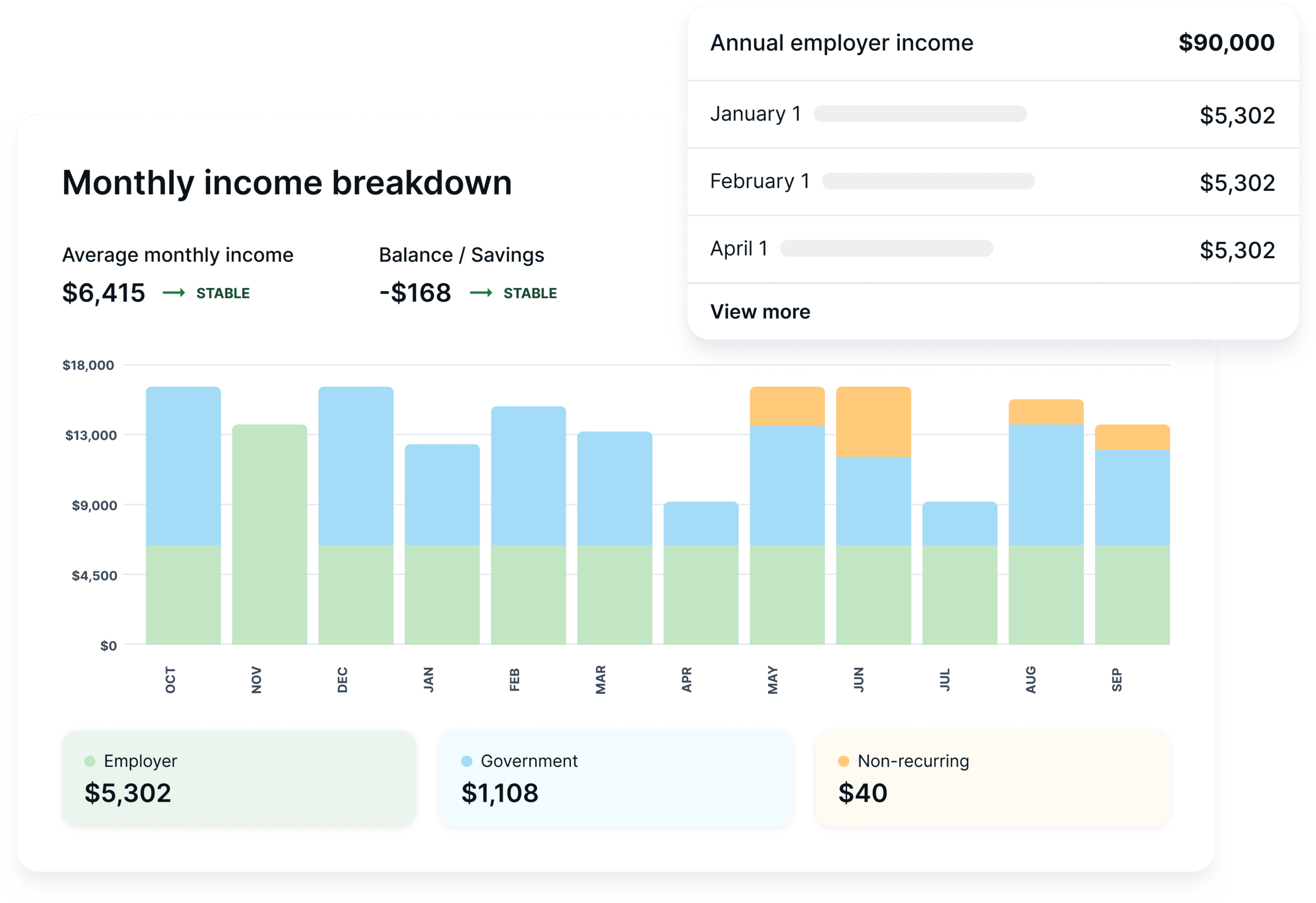
This is where the report gets granular. Bank-Verified Income categorizes the tenant’s income into specific streams:
- Employer income — regular deposits from identified employers, with individual transactions listed including dates, descriptions, and amounts
- Non-employer revenue — freelance payments, e-transfers, and other non-payroll income
- Government support — specific government payments (EI, CRA deposits, provincial benefits)
- Government income — broader government-sourced deposits
Each category shows a total and lists the individual transactions that make it up.
Mac’s Pro Tip: For tenants with non-traditional income, the detailed breakdown is where you’ll find the full picture. A freelance graphic designer might not have a single employer deposit, but you’ll see consistent client payments under non-employer revenue. A student might show parental e-transfers alongside a part-time job. The breakdown lets you assess the whole income picture rather than dismissing someone because they don’t fit a standard payroll pattern.
Confidence Scoring
At the bottom of the Bank-Verified Income section, you’ll notice the system distinguishes between verified income and suggested income. Verified transactions are ones the system has matched to known income patterns with high confidence. Suggested transactions appear to be income but require the landlord’s judgment. Transactions might be large one-time e-transfers, refunds, or other deposits that look like income but could be something else.
This transparency is deliberate. Rather than inflating the income figure by counting every deposit as earnings, Bank-Verified Income shows you exactly how much of the reported income is confirmed versus inferred, so you can make your own call.
Why You Can Trust This Data
This is the question worth asking about any verification tool. Here’s what makes Bank-Verified Income data reliable:
The data comes directly from the bank. When a tenant connects through Flinks, the information is pulled from their financial institution’s systems. It doesn’t pass through the tenant’s hands. There’s no document for them to edit, no file for them to upload, and no screenshot for them to crop.
The tenant cannot modify the data. Unlike uploaded bank statements (where a tenant could edit a PDF or selectively share certain pages) Bank-Verified Income pulls the complete transaction history for the authorized period. The tenant authorizes the connection, but they don’t control what data comes through.
Flinks uses bank-grade security. Flinks is a regulated financial data provider. The connection between the tenant’s bank and your report is encrypted end-to-end. Tenant banking credentials are never stored by SingleKey.
You’re seeing real transactions. Every deposit, every withdrawal, every balance shown in the report corresponds to an actual transaction recorded by the bank. This isn’t self-reported income or an estimate. It’s the same data the bank would confirm if you called them directly.
Mac’s Pro Tip: The real power of Bank-Verified Income is the cross-reference. The application says the tenant earns $6,000 a month: does the bank data back that up? The employment section names a specific employer: do the deposits line up? A reference letter says the tenant has been employed for two years: does the transaction history confirm regular pay deposits over that period? Each piece of the report becomes more valuable when you can check it against verified bank data.
Occupants
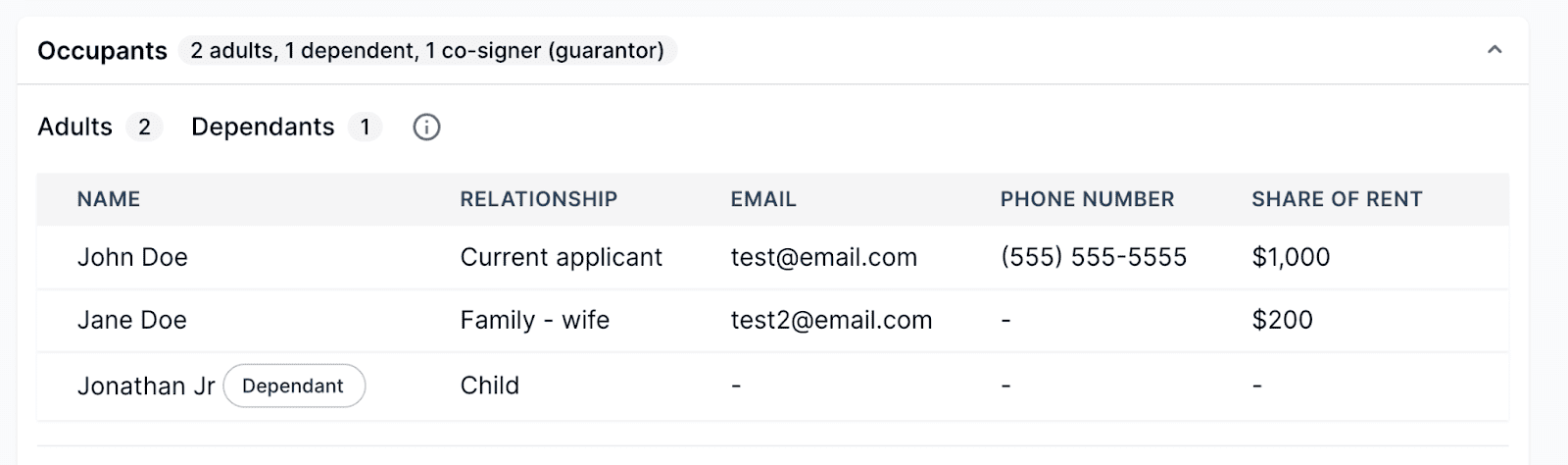
If additional people are moving in with the applicant, their names, contact information, share of the rent, and other key details will be listed here.
Co-signer (Guarantor)

If necessary, the applicant will provide the name of their co-signer or guarantor and how to contact them. It’s important to vet the co-signer as you would a rental applicant, as they’re taking financial responsibility for the primary applicant.
Pets

Here, you’ll find details of any pets who will live with the applicant in the rental, such as the animal type, breed, and weight.
Vehicles

Knowing whether a tenant owns a car is helpful to ensure you can accommodate them with a parking spot. If applicable, you’ll find basic information about their vehicle here.
Additional information
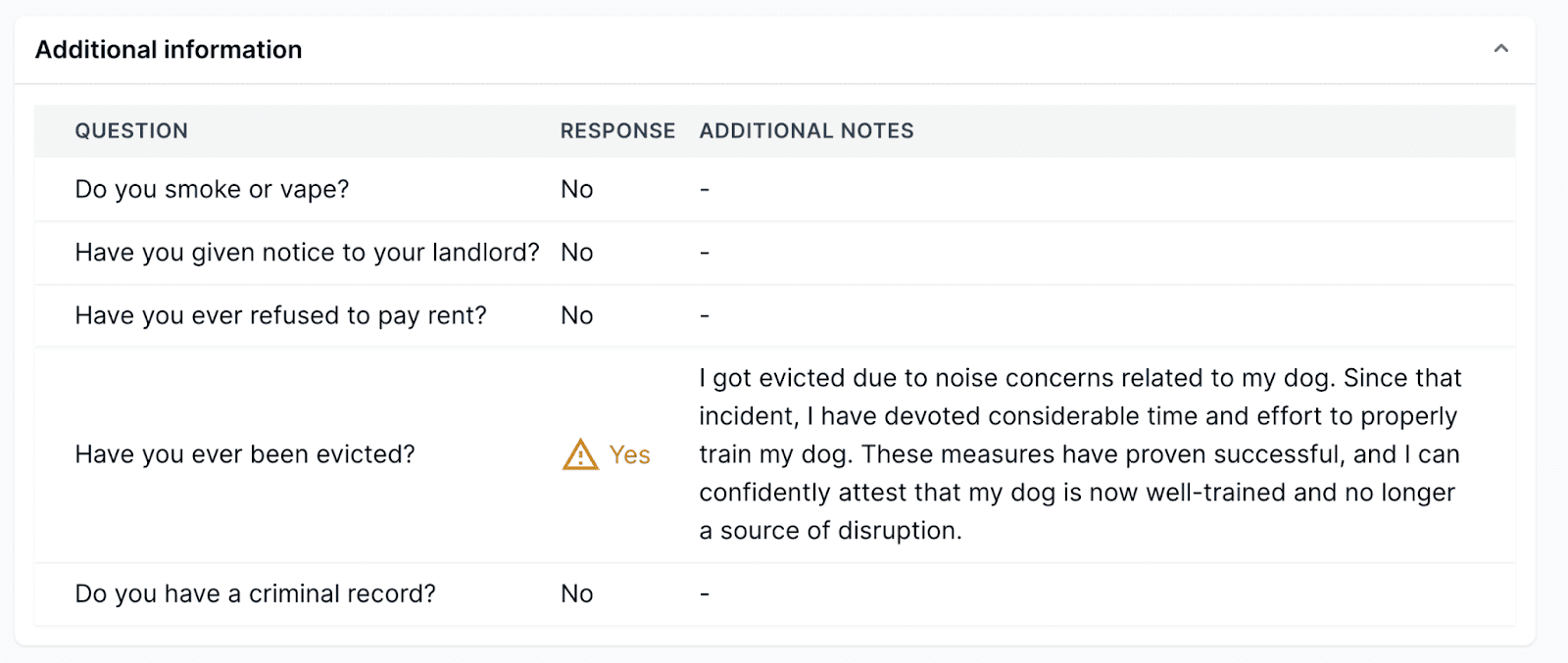
This section usually lists any other facts about an applicant not found anywhere else in the report. Depending on what information they have chosen to disclose, you’ll know whether they smoke, have declared bankruptcy, provided their current landlord with proper notice, or have been convicted of a serious crime. They’re also given the opportunity to explain their answers further here.
Personal message from the tenant

The applicant will disclose additional information here or include links about themselves. They may also comment on your rental.
Uploaded by the tenant
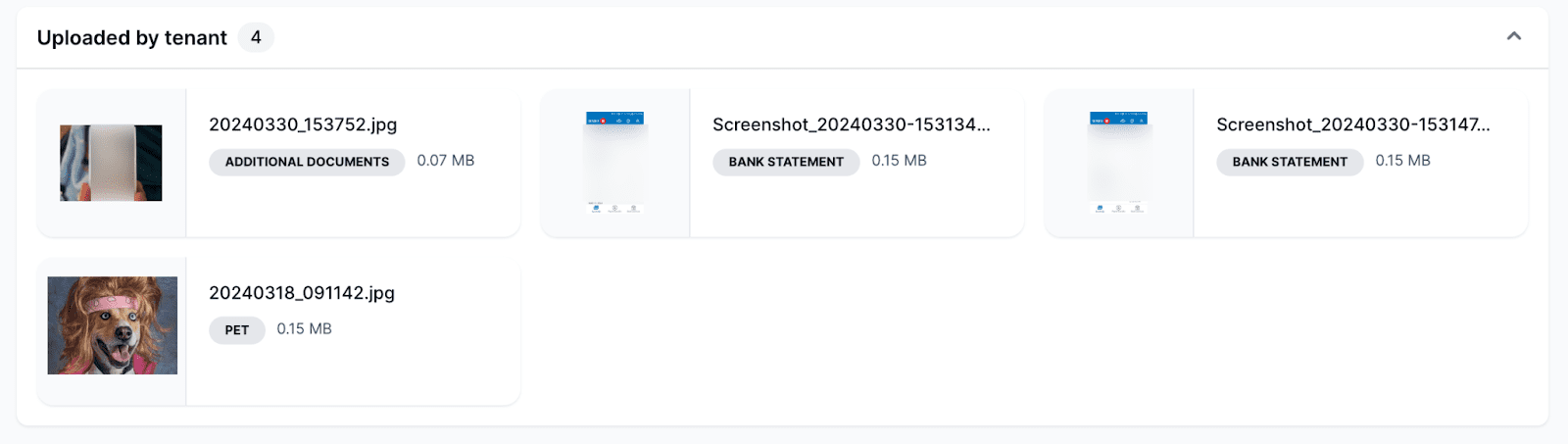
You’ll find a collection here of all the files uploaded by the applicant. These may include their government-issued ID, pet photos, bank statements, pay stubs, and a work permit. The applicant is free to add any documentation they want or that you request. Each preview contains a thumbnail, file name, category tag, and file size. You can choose which document types are mandatory or optional.
Applicant consent
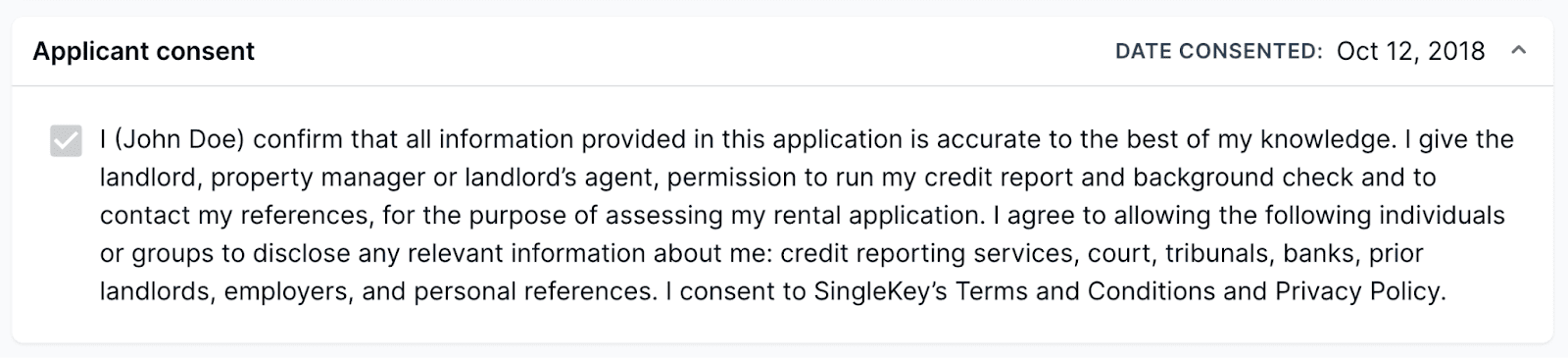
In most jurisdictions, this is required before you can conduct landlord and employment reference checks. You would be expected to produce this confirmation before another party discloses any personal information about the applicant. By checking this box, the applicant provides their consent and guarantees the information they’ve supplied you with is truthful and accurate.
Credit report
This part of the tenant screening report is taken directly from the credit bureau. SingleKey users may choose credit checks from Equifax, TransUnion, both of these bureaus, or Nova Credit when screening international tenants. You can find out more about the difference between Equifax and TransUnion credit reports here.
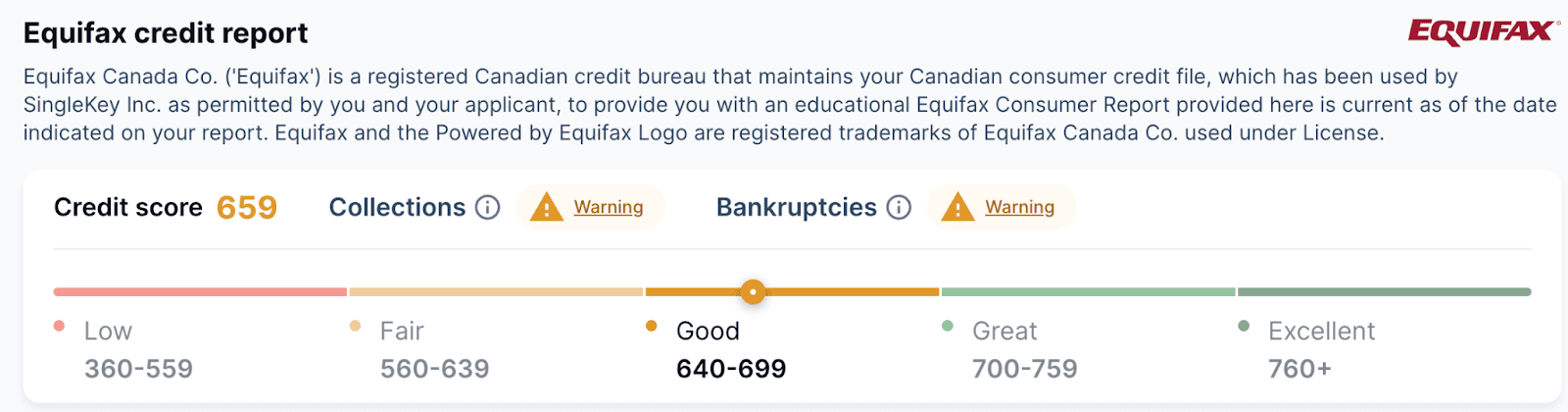
At the top left of this section, you’ll see a three-digit credit score, which measures creditworthiness. The credit score range for Equifax, TransUnion, and Nova Credit is 300-850.
The score shows the likelihood that the individual will pay their bills on time, which includes rent. While a high score may indicate a low risk in accepting the applicant as a tenant, remember that this score captures one moment in a person’s financial history. It doesn’t represent their full financial track record.
Errors and warnings
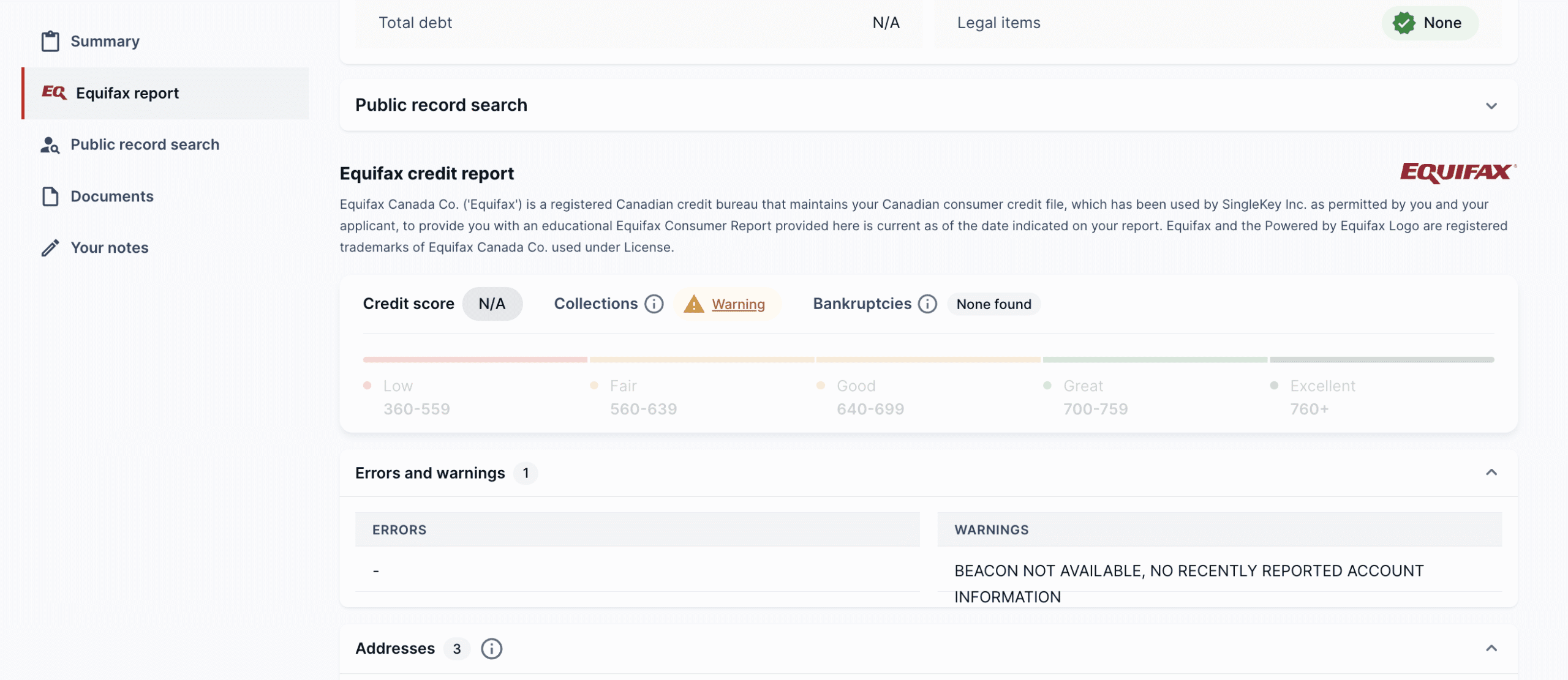
This section includes critical warnings that require further investigation. This is where instances of credit fraud, identity theft, or disputes with the credit bureau will be reported.
This part of the tenant report is also where you may see a “NO HIT” error. This means that the credit bureau didn’t return a match on the applicant’s credit profile. If you see this error, verify that the tenant’s information has been entered correctly.
Addresses
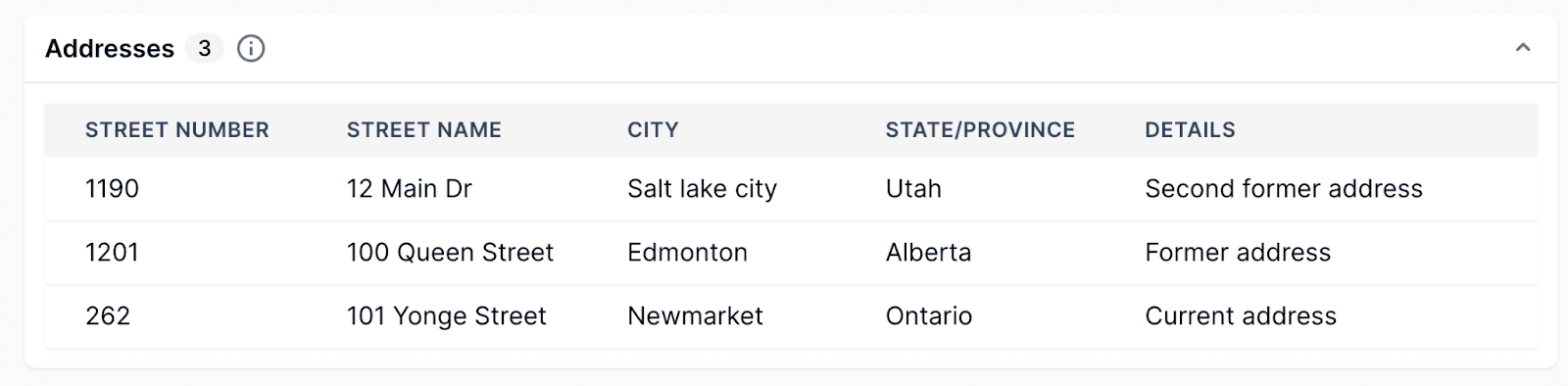
These are the billing addresses reported to the credit bureau by various companies. For example, you’ll find the billing address for a cell phone service here.
Employment
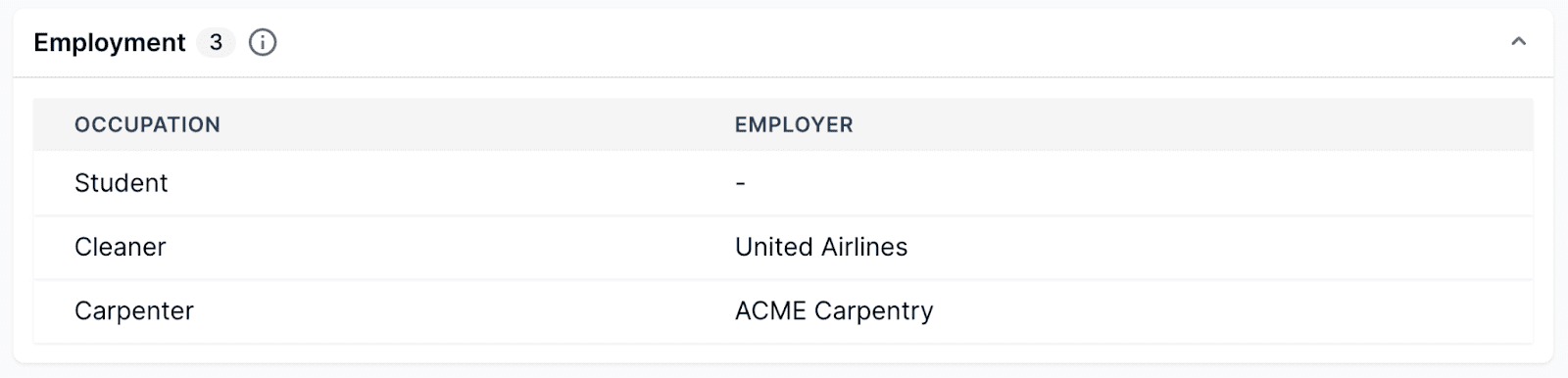
If an individual has given a creditor information about where they work, those employment details will be listed in this section. Lenders typically ask for employer information on credit applications to help verify a person’s identity, but they’re not obligated to report this history to the credit bureaus.
Debt summary
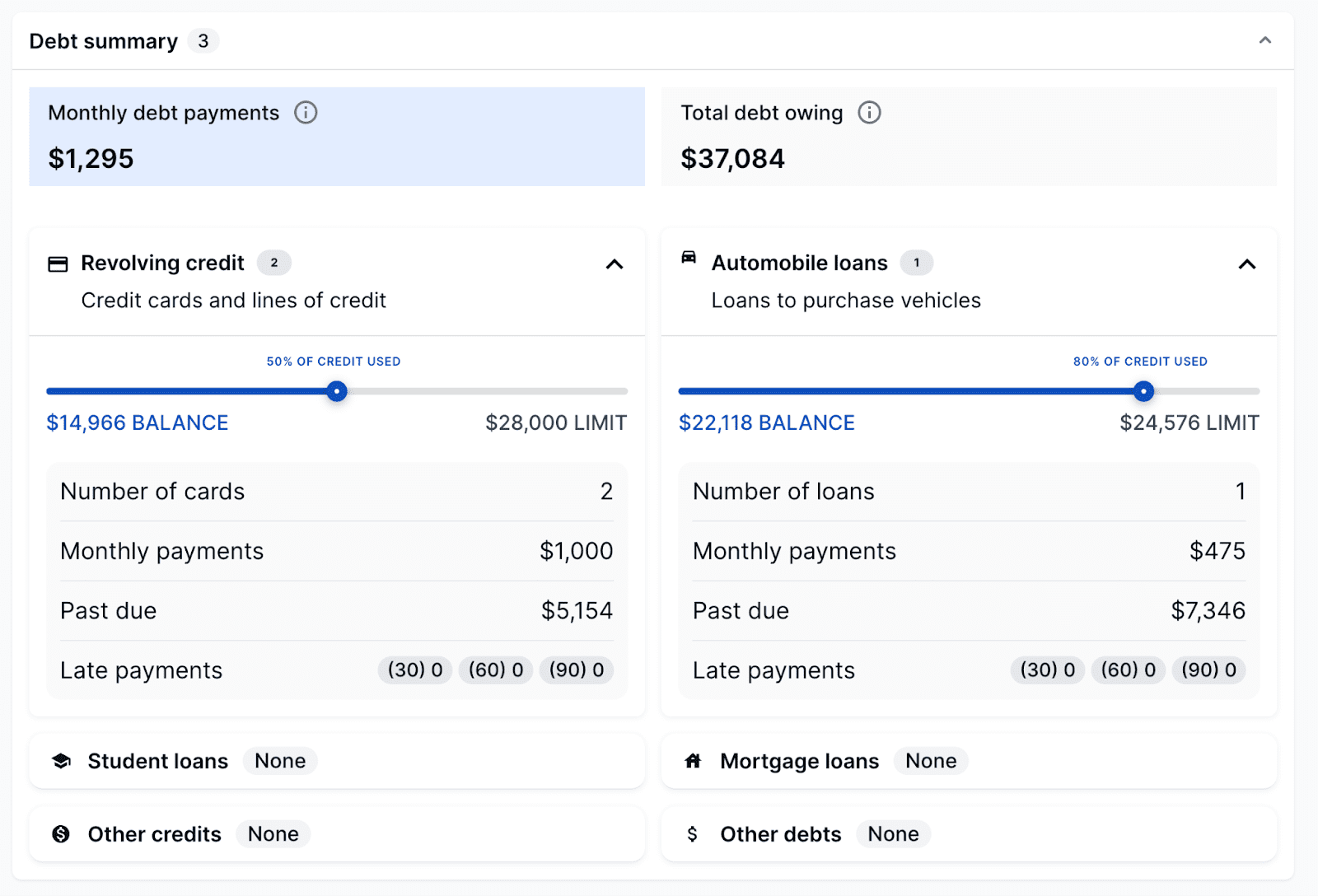
This section summarizes all of the outstanding debt or credit utilized by the individual. It’s broken into two categories:
- Monthly debt payments
- Total debt owing
Each category lists related tradelines and the loan details for a specific tradeline.
Tradelines
A tradeline is a credit product obtained by the individual. Tradelines include revolving credit, like credit cards and lines of credit, and installment loans, like mortgages and vehicle loans. Key details to consider are the total utilization, months reviewed, and past due and late payments buckets (30,60,90). The tradelines are color coded as follows:
- Green (good): Paid as agreed and up to date
- Yellow (caution): Overdue account, at least 120 past due
- Red (bad) – Tradeline written off and sent to collections
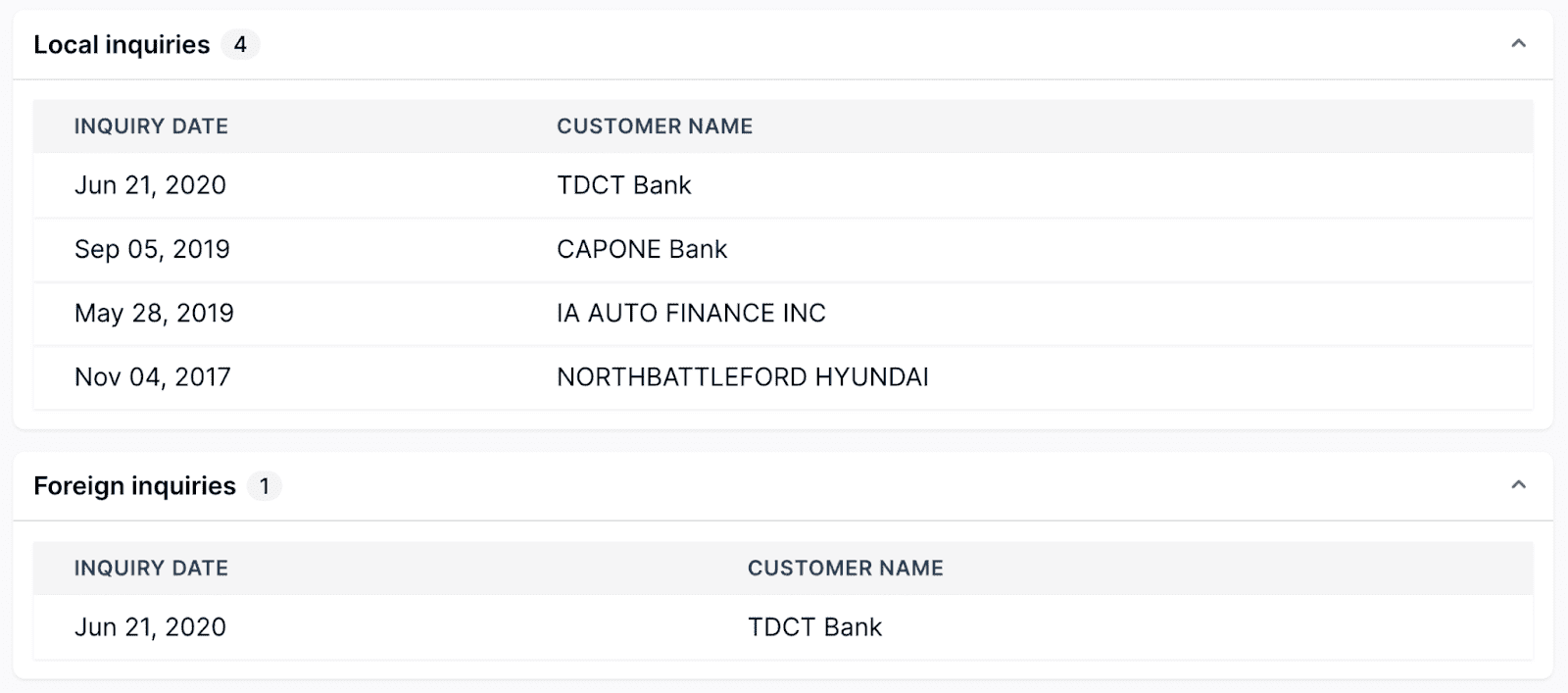
Local and foreign inquiries
Bankruptcies, collections, and miscellaneous
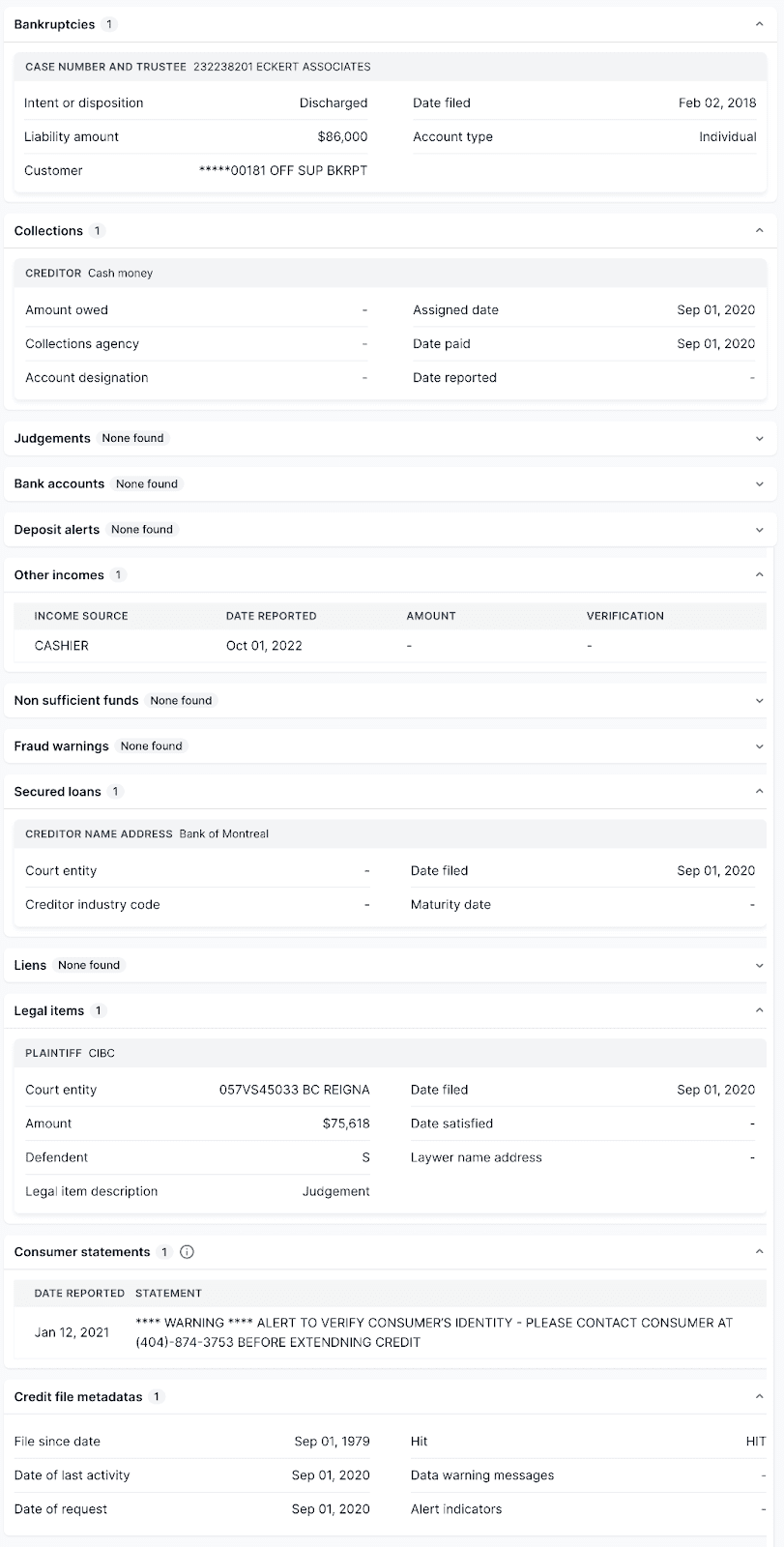
This section contains various reported alerts. Some of the most common ones to be concerned about are bankruptcies, collections, and judgments. Any hits here warrant further investigation by the homeowner or property manager, as these are in most cases negative indicators.
Public record search
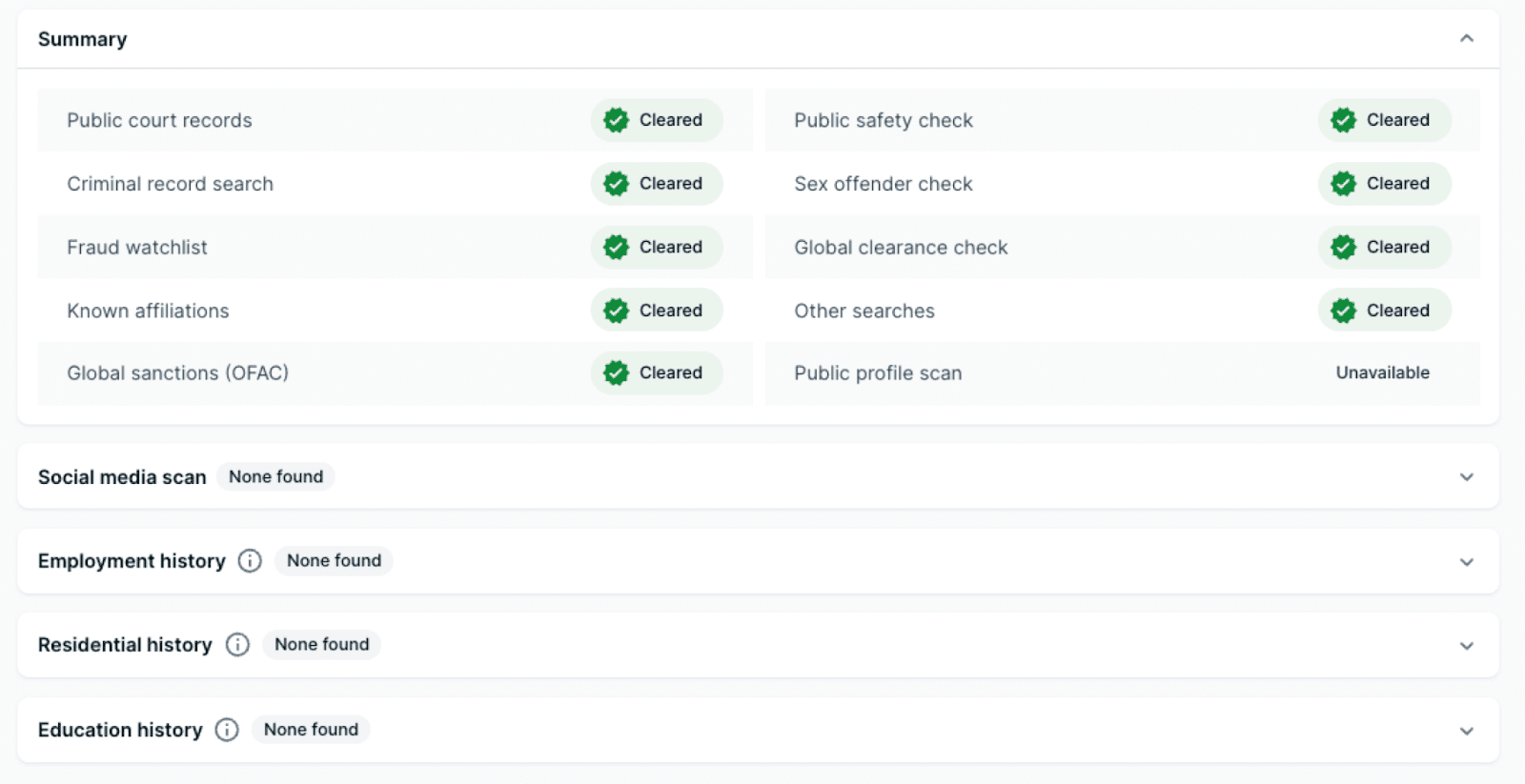
This section includes information about an applicant’s background gathered from publicly available sources. Details may include everything from past employers to court decisions and social media posts.
Keep in mind that the public record search is a real-time scan of 110,000 databases from over 240 countries to collect criminal records, court decisions, negative press, social profiles, public biographies, and past employment data. Not all of this information is accessible to the public.
If a criminal record turns up in this part of the report, speak to the tenant before you disqualify them outright. You may also want to consider factors such as the nature of the offense, how long ago it took place, and whether the tenant’s presence will threaten you and your neighbors.
Learn more about Tenant Screening


